OAuth Authentication
The module auth-oauth provides general OAuth Authentication, with built-in support for GitHub and other OAuth providers. It also supports mock user login in the development environment, making development and debugging very convenient.
How to Use
1. Login
class ControllerStudent {
  @Web.get('login')
  @Passport.public()
  async login() {
    await this.bean.auth.authenticate('auth-oauth:oauth', { clientName: 'github', state: { redirect: '/' } });
  }
}2. Logout
await this.bean.passport.signout();3. Authentication Credentials
Set the authentication credentials in App Config.
src/backend/config/config/config.ts
// onions
config.onions = {
  authProvider: {
    'auth-oauth:oauth': {
      clients: {
        github: {
          clientID: 'xxxxxx',
          clientSecret: 'xxxxxxx',
        },
      },
    },
  },
};clients.github: A Provider can set multiple Clients, currently built-in withgithub
4. Adding New OAuth Client Credentials
Taking google as an example:
- Install the corresponding Strategy npm package
$ pnpm add passport-google-oauth20 -w- Add Client type definitions using the interface merging mechanism
In VSCode editor, enter the code snippet recordauthclient to automatically generate the code skeleton:
declare module 'vona-module-x-x' {
  export interface IAuthProvider_xxx_ClientRecord {
    : never;
  }
}Adjust the code:
declare module 'vona-module-auth-oauth' {
  export interface IAuthProviderOauthClientRecord {
    google: never;
  }
}- Set the authentication credentials in App Config and specify the corresponding
Strategy
import StrategyGoogle from 'passport-google-oauth20';

// onions
config.onions = {
  authProvider: {
    'auth-oauth:oauth': {
      clients: {
        google: {
          Strategy: StrategyGoogle,
          clientID: 'xxxxxx',
          clientSecret: 'xxxxxxx',
        },
      },
    },
  },
};5. OAuth Authentication Callback URL
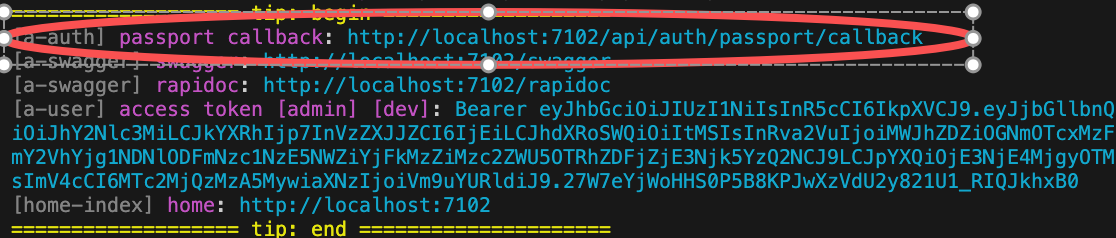
When using OAuth authentication, you need to provide the system's Callback URL on the OAuth website.
VonaJS provides a unified Callback URL value and outputs it directly to the console during development for easy use.
6. Disable useMockForDev
By default, mocking user login is allowed in the development environment.
useMockForDev can be disabled in App Config.
src/backend/config/config/config.ts
// onions
config.onions = {
  authProvider: {
    'auth-oauth:oauth': {
      useMockForDev: false,
    },
  },
};Source Code Analysis
This section analyzes the core source code of the module auth-oauth to illustrate how to develop an OAuth2-based Auth Provider.
For example, creating an Auth Provider: oauth in the module auth-oauth
1. CLI Command
$ vona :create:bean authProvider oauth --module=auth-oauth2. Menu Command
TIP
Context Menu - [Module Path]: Vona Bean/Auth Provider
Auth Provider Definition
export interface IAuthProviderOauthClientOptionsGithub extends IAuthProviderOauth2ClientOptions {
  userProfileURL?: string;
  userAgent?: string;
}

export interface IAuthProviderOauthClientRecord extends IAuthProviderClientRecord {
  github: IAuthProviderOauthClientOptionsGithub;
}

export interface IAuthProviderOauthClientOptions extends IAuthProviderOauth2ClientOptions {
  Strategy?: Constructable<StrategyBase>;
}

export interface IAuthProviderOptionsOauth extends IDecoratorAuthProviderOptions<
  IAuthProviderOauthClientRecord,
  IAuthProviderOauthClientOptions
> {}

@AuthProvider<IAuthProviderOptionsOauth>({
  base: {
    confirmed: true,
    clientID: 'Shoule specify clientID',
    clientSecret: 'Shoule specify clientSecret',
  },
  clients: {
    github: {
      Strategy: StrategyGithub,
    },
  },
})
class AuthProviderOauth extends BeanAuthProviderOauth2Base {
  async strategy(
    clientOptions: IAuthProviderOauthClientOptions,
    _options: IAuthProviderOptionsOauth,
  ): Promise<Constructable<StrategyBase>> {
    if (!clientOptions.Strategy) throw new Error('Should specify Strategy for oauth provider');
    return clientOptions.Strategy;
  }
}IAuthProviderOauthClientRecord: Defines multiple Clients, with built-ingithubClient definitionIAuthProviderOauthClientOptions: Defines Client options, where theStrategyfield specifies the OAuth authentication strategyIAuthProviderOptionsOauth: Defines the parameters of the Auth Providerstrategy: Returns the authentication strategy based on theStrategyconfigured in the Clientverify: Provided by the base classBeanAuthProviderOauth2Baseby default, uses the utility methodgetStrategyOauth2Profileto extract Profile data from the authentication result and returns it to the system
Custom OAuth Strategy
The module auth-oauth uses the Strategy field to specify the OAuth authentication strategy, allowing flexible support for different OAuth providers.
Built-in strategy: The module has a built-in
githubClient configuration with thepassport-githubstrategyAdding a new strategy: Taking
googleas an example, the following steps are required
- Install the corresponding Strategy npm package
$ pnpm add passport-google-oauth20 -w- Add a new Client type definition using the interface merging mechanism
declare module 'vona-module-auth-oauth' {
  export interface IAuthProviderOauthClientRecord {
    google: IAuthProviderOauth2ClientOptions;
  }
}- Specify the corresponding
Strategyin App Config
import StrategyGoogle from 'passport-google-oauth20';

// onions
config.onions = {
  authProvider: {
    'auth-oauth:oauth': {
      clients: {
        google: {
          Strategy: StrategyGoogle,
          clientID: 'xxxxxx',
          clientSecret: 'xxxxxxx',
        },
      },
    },
  },
};Profile
- The Provider's
verifyonly needs to return Profile data. The system will generate a User object based on the Profile data - The Profile contains an
idfield value - The OAuth provider ensures that a unique
idvalue is generated for each different user
Profile has a unified interface definition:
export interface IAuthUserProfile {
  id: string;
  username?: string;
  displayName?: string;
  name?: IAuthUserProfileName;
  gender?: string; // male/female
  profileUrl?: string;
  emails?: IAuthUserProfilePropSlice[];
  photos?: IAuthUserProfilePropSlice[];
  locale?: keyof ILocaleRecord;
  confirmed?: boolean;
}confirmed: Iftrue, it means the user has confirmed and no furtheractivationoperation is needed