Broadcast
Broadcasts can be emitted to multiple worker processes in the system, allowing each worker process to execute business logic.
Create Broadcast
For example, create a broadcast echo in the module demo-student, so that each worker process outputs Hello world to the console.
1. Cli Command
$ vona :create:bean broadcast echo --module=demo-student2. Menu Command
TIP
Context Menu - [Module Path]: Vona Bean/Broadcast
Broadcast Definition
export interface TypeBroadcastEchoJobData {
  message: string;
}

@Broadcast()
export class BroadcastEcho
  extends BeanBroadcastBase<TypeBroadcastEchoJobData>
  implements IBroadcastExecute<TypeBroadcastEchoJobData>
{
  async execute(data: TypeBroadcastEchoJobData, isEmitter?: boolean) {
    if (!isEmitter) {
      console.log(`pid: ${process.pid} message: ${data.message}`);
    }
  }
}TypeBroadcastEchoJobData: Defines broadcast dataexecute: Outputs the message to the console
- execute parameters
| Name | Description |
|---|---|
| data | Broadcast data |
| isEmitter | Whether it is the worker process emiting the broadcast |
Emit Broadcast
class ControllerStudent {
  test() {
    const data = { message: 'Hello world' };
    console.log(`pid: ${process.pid} message: ${data.message}`);
    this.scope.broadcast.echo.emit(data);
  }
}this.scope.broadcast.echo: Retrieves the broadcast instance through the module scopeemit: Emits the broadcast, passing in the broadcast data
TIP
If business logic has already been executed in the current worker process, you can check isEmitter in the execute method to ignore the worker process that emit the broadcast
Broadcast Parameters
Parameters can be configured for broadcasts.
@Broadcast({
  instance: true,
  transaction: true,
})
class BroadcastEcho {}| Name | Description |
|---|---|
| instance | Whether to ensure that the instance has been initialized. Defaults to true |
| transaction | Whether to enable database transaction |
instance: VonaJS supportsmulti-instance/multi-tenancy. If the broadcast's business logic requires manipulating instance data, then you need to ensure that the instance has been initializedtransaction: If set to true, the system will automatically put the broadcast'sexecutemethod into a database transaction
App Config
Broadcast parameters can be configured in App Config.
src/backend/config/config/config.ts
// onions
config.onions = {
  broadcast: {
    'demo-student:echo': {
      instance: true,
      transaction: true,
    },
  },
};Inspect
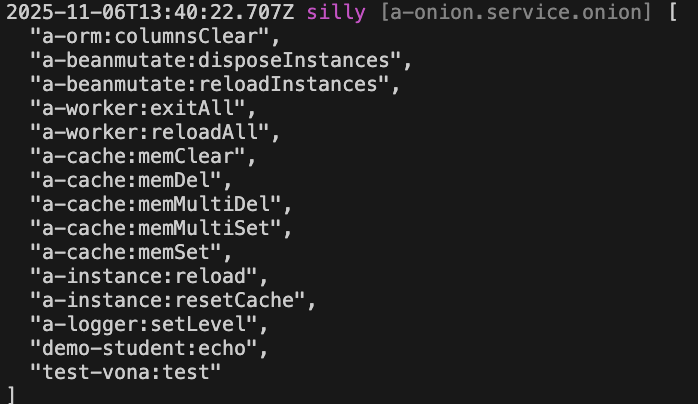
You can directly inspect the currently effective broadcast list.
class ControllerStudent {
  @Web.get('test')
  test() {
+   this.bean.onion.broadcast.inspect();
  }
}this.bean.onion: Get the global Service instanceonion.broadcast: Get the Service instance related to the broadcast.inspect: Output the currently effective broadcast list
When accessing the test API, the currently effective broadcast list will be automatically output to the console, as shown below: