Authentication System
The module a-auth provides a general authentication system, using Auth Provider to support various authentication methods.
Features
Auth Provider: Supports various authentication methods, such as username/password authentication, OAuth authentication, etcClients: A single provider can provide multiple credentialsAssociate Authentication: Allows associating multiple authentication methods with the same userMigrate Authentication: Allows migrating authentication methods from one user to another
bean.auth
The module a-auth provides a global Bean bean.auth, allowing the use of authentication capabilities provided by all providers in a unified way.
- Example:
Username/PasswordAuthentication
class ControllerStudent {
  @Web.get('login')
  @Passport.public()
  async login() {
    const jwt = await this.bean.auth.authenticate('auth-simple:simple', {
      clientOptions: { username: 'admin', password: '123456' },
    });
    return jwt;
  }
}- Example:
OAuthAuthentication
class ControllerStudent {
  @Web.get('login')
  @Passport.public()
  async login() {
    await this.bean.auth.authenticate('auth-oauth:oauth', { clientName: 'github', state: { redirect: '/' } });
  }
}OAuth Credentials
Using OAuth authentication as an example, set the authentication credentials in the App Config.
src/backend/config/config/config.ts
// onions
config.onions = {
  authProvider: {
    'auth-oauth:oauth': {
      clients: {
        github: {
          clientID: 'xxxxxx',
          clientSecret: 'xxxxxxx',
        },
      },
    },
  },
};clients.github: A Provider can set multiple Clients, currently built-in withgithub
How to Add New OAuth Client Credentials
Taking google as an example:
- Install the corresponding Strategy npm package
$ pnpm add passport-google-oauth20 -w- Add Client type definitions using the interface merging mechanism
In VSCode editor, enter the code snippet recordauthclient to automatically generate the code skeleton:
declare module 'vona-module-x-x' {
  export interface IAuthProvider_xxx_ClientRecord {
    : never;
  }
}Adjust the code:
declare module 'vona-module-auth-oauth' {
  export interface IAuthProviderOauthClientRecord {
    google: never;
  }
}- Set the authentication credentials in App Config and specify the corresponding
Strategy
import StrategyGoogle from 'passport-google-oauth20';

// onions
config.onions = {
  authProvider: {
    'auth-oauth:oauth': {
      clients: {
        github: {
          clientID: 'xxxxxx',
          clientSecret: 'xxxxxxx',
        },
        google: {
          Strategy: StrategyGoogle,
          clientID: 'yyyyyy',
          clientSecret: 'yyyyyyy',
        },
      },
    },
  },
};OAuth Authentication Callback URL
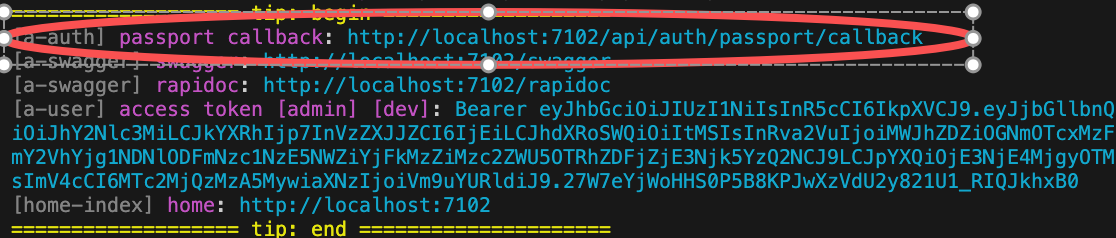
When using OAuth authentication, you need to provide the system's Callback URL on the OAuth website.
VonaJS provides a unified Callback URL value and outputs it directly to the console during development, making it convenient for us to use directly.
bean.auth.authenticate
Method Definition
async authenticate<T extends keyof IAuthProviderRecord>(
  authProviderName: T,
  options?: IAuthenticateOptions<IAuthProviderRecord[T]>,
): Promise<IJwtToken | undefined>{}Return Value
For authentication methods that do not require redirection, a jwt token is returned upon successful authentication
For authentication methods requiring a redirect, the system will redirect directly upon successful authentication
Parameters
| Name | Description |
|---|---|
| authProviderName | Provider name |
| options.clientName | Client name, defaults to default |
| options.clientOptions | Client options, different providers have different options definitions |
| options.state | Status value of this authentication |
- options.clientOptions
For OAuth authentication, the following basic fields are available:
| Name | Description |
|---|---|
| clientID | Credential ID |
| clientSecret | Credential Secret |
| scope | Authorization scope |
| confirmed | Whether the user is in a confirmed state |
TIP
confirmed: Generally, for new users, if OAuth authentication returns a valid email, confirmed=true can be assumed, thus eliminating the need for subsequent user activation operation. The confirmed judgment rules can be flexibly customized according to business needs
- options.state
| Name | Type | Description |
|---|---|---|
| intention | 'register' | 'login' | 'associate' | 'migrate' | The intent of this authentication, defaults to login |
| redirect | string | undefined | The URL to redirect to after successful authentication |
TIP
redirect: After successful OAuth authentication, a code value will be returned. This value will be appended to the URL Query, in the form of: /?x-vona-oauth-code=xxxxxx
The frontend obtains the x-vona-oauth-code value and then calls the backend API to exchange it for a jwt token
Passport API
The home-user module provides a set of out-of-the-box Passport API. The API can also be used to extend custom business logic.
src/suite/a-home/modules/home-user/src/controller/passport.ts
| Name | Description |
|---|---|
| current | Get the current Passport |
| logout | Logout |
| register | Register new user |
| login | Login |
| loginOauth | OAuth authentication |
| associate | Associate authentication |
| migrate | Migrate authentication |
| createPassportJwtFromOauthCode | Exchange the code returned by OAuth authentication for jwt token and Passport |
| refreshAuthToken | Refresh authToken using refreshToken |
| createTempAuthToken | Create a temporary authToken |