OAuth认证
模块auth-oauth提供了通用的OAuth认证,内置支持Github等 OAuth 提供方,并且支持在开发环境采用模拟用户登录,使得开发与调试非常方便。
如何使用
1. 登录
typescript
class ControllerStudent {
  @Web.get('login')
  @Passport.public()
  async login() {
    await this.bean.auth.authenticate('auth-oauth:oauth', { clientName: 'github', state: { redirect: '/' } });
  }
}2. 退出登录
typescript
await this.bean.passport.signout();3. 设置认证凭据
在 App Config 中设置认证凭据。
src/backend/config/config/config.ts
typescript
// onions
config.onions = {
  authProvider: {
    'auth-oauth:oauth': {
      clients: {
        github: {
          clientID: 'xxxxxx',
          clientSecret: 'xxxxxxx',
        },
      },
    },
  },
};clients.github: 一个 Provider 可以设置多个 Clients,当前内置了github
4. 添加新的OAuth Client凭据
- 首先采用接口合并机制添加 Client 类型定义
在 VSCode 编辑器中,输入代码片段recordauthclient,自动生成代码骨架:
typescript
declare module 'vona-module-x-x' {
  export interface IAuthProvider_xxx_ClientRecord {
    : never;
  }
}调整代码:
typescript
declare module 'vona-module-auth-oauth' {
  export interface IAuthProviderOauthClientRecord {
    google: never;
  }
}- 然后在 App Config 中设置认证凭据
diff
// onions
config.onions = {
  authProvider: {
    'auth-oauth:oauth': {
      clients: {
        github: {
          clientID: 'xxxxxx',
          clientSecret: 'xxxxxxx',
        },
+       google: {
+         clientID: 'yyyyyy',
+         clientSecret: 'yyyyyyy',
+       },
      },
    },
  },
};5. OAuth认证Callback URL
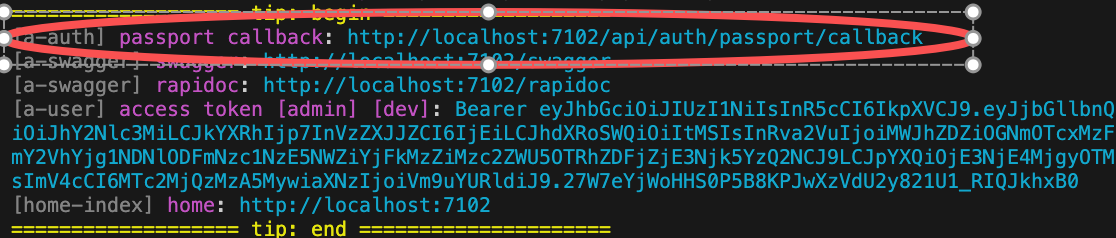
在使用 OAuth 认证时,需要在 OAuth 网站提供系统的 Callback URL。
VonaJS 提供了统一的 Callback URL 值,并且在开发阶段直接输出在控制台,方便我们直接使用。
6. 禁用useMockForDev
在默认情况下,允许在开发环境模拟用户登录。
可以在 App Config 中禁用useMockForDev
src/backend/config/config/config.ts
typescript
// onions
config.onions = {
  authProvider: {
    'auth-oauth:oauth': {
      useMockForDev: false,
    },
  },
};源码解析
这里对模块auth-oauth的核心源码进行解析,从而说明如何开发一个基于 OAuth2 的 Auth Provider。
比如,在模块auth-oauth中创建一个 Auth Provider: oauth
1. Cli命令
bash
$ vona :create:bean authProvider oauth --module=auth-oauth2. 菜单命令
TIP
右键菜单 - [模块路径]: Vona Bean/Auth Provider
Auth Provider定义
typescript
export interface IAuthProviderOauthClientOptionsGithub extends IAuthProviderOauth2ClientOptions {
  userProfileURL?: string;
  userAgent?: string;
}

export interface IAuthProviderOauthClientRecord extends IAuthProviderClientRecord {
  github: IAuthProviderOauthClientOptionsGithub;
}

export interface IAuthProviderOauthClientOptions extends IAuthProviderOauth2ClientOptions {
  Strategy?: Constructable<StrategyBase>;
}

export interface IAuthProviderOptionsOauth extends IDecoratorAuthProviderOptions<
  IAuthProviderOauthClientRecord,
  IAuthProviderOauthClientOptions
> {}

@AuthProvider<IAuthProviderOptionsOauth>({
  base: {
    confirmed: true,
    clientID: 'Shoule specify clientID',
    clientSecret: 'Shoule specify clientSecret',
  },
  clients: {
    github: {
      Strategy: StrategyGithub,
    },
  },
})
class AuthProviderOauth extends BeanAuthProviderOauth2Base {
  async strategy(
    clientOptions: IAuthProviderOauthClientOptions,
    _options: IAuthProviderOptionsOauth,
  ): Promise<Constructable<StrategyBase>> {
    if (!clientOptions.Strategy) throw new Error('Should specify Strategy for oauth provider');
    return clientOptions.Strategy;
  }
}IAuthProviderOauthClientRecord: 定义多个 Clients,内置了github的 Client 定义IAuthProviderOauthClientOptions: 定义 Client options,其中Strategy字段用于指定 OAuth 认证策略IAuthProviderOptionsOauth: 定义 Auth Provider 的参数strategy: 根据 Client 中配置的Strategy返回对应的认证策略verify: 由基类BeanAuthProviderOauth2Base提供默认实现,使用工具方法getStrategyOauth2Profile从认证结果中提取出 Profile 数据,并返回给系统
自定义OAuth策略
模块auth-oauth采用Strategy字段来指定 OAuth 认证策略,从而可以灵活支持不同的 OAuth 提供方。
内置策略:模块默认内置了
github的 Client 配置,并预置了passport-github策略添加新策略:以添加
google为例,需要以下步骤
- 安装对应的 Strategy npm 库
bash
$ pnpm add passport-google-oauth20 -w- 通过接口合并机制添加新的 Client 类型定义
typescript
declare module 'vona-module-auth-oauth' {
  export interface IAuthProviderOauthClientRecord {
    google: IAuthProviderOauth2ClientOptions;
  }
}- 在 App Config 中指定对应的
Strategy
typescript
import StrategyGoogle from 'passport-google-oauth20';

// onions
config.onions = {
  authProvider: {
    'auth-oauth:oauth': {
      clients: {
        google: {
          Strategy: StrategyGoogle,
          clientID: 'xxxxxx',
          clientSecret: 'xxxxxxx',
        },
      },
    },
  },
};Profile
- Provider 的
verify只需返回 Profile 数据。系统将根据 Profile 数据生成 User 对象 - Profile 中存在
id字段值 - 由 OAuth 提供方确保为不同的用户生成唯一的
id值
Profile 具有统一的接口定义:
typescript
export interface IAuthUserProfile {
  id: string;
  username?: string;
  displayName?: string;
  name?: IAuthUserProfileName;
  gender?: string; // male/female
  profileUrl?: string;
  emails?: IAuthUserProfilePropSlice[];
  photos?: IAuthUserProfilePropSlice[];
  locale?: keyof ILocaleRecord;
  confirmed?: boolean;
}confirmed: 如果为true,意味着用户已经确认,不需要后续的激活操作